v0.1.0 · Free · Windows · No jailbreak
Sideload apps onto your iPhone from Windows.
ByteLoader signs IPA files with your own Apple ID and installs them over USB. No jailbreak, no paid developer account, no subscription. Drop the file, press install.
- Price
- Free
- Runs on
- Windows 10 / 11, 64-bit
- Installs to
- iPhone and iPad on iOS 16 or later
- Made by
- ByteKnot Labs
Features
Everything you need to sideload. Nothing you do not.
A free Apple ID is enough
No paid Apple Developer membership. Sign in with a normal Apple ID and ByteLoader handles the certificate, app IDs and provisioning profile for you.
No jailbreak
Works with a stock iPhone or iPad. Nothing about the device changes except the apps you choose to install.
Drop, install, done
Drag an .ipa onto the window and press Install on device. Signing and installing a small app takes about half a minute.
The IPA never leaves your PC
Signing happens entirely on your machine. Only the metadata Apple requires goes out: bundle IDs, your device's identifier and a certificate request.
Two-factor authentication works
Sign in with the six-digit code from one of your trusted Apple devices. Your password goes only to Apple, never to us.
Knows when apps expire
ByteLoader remembers every app it installed and shows the exact expiry date with a countdown, so a free-account signature never surprises you.
- 01
Connect over USB
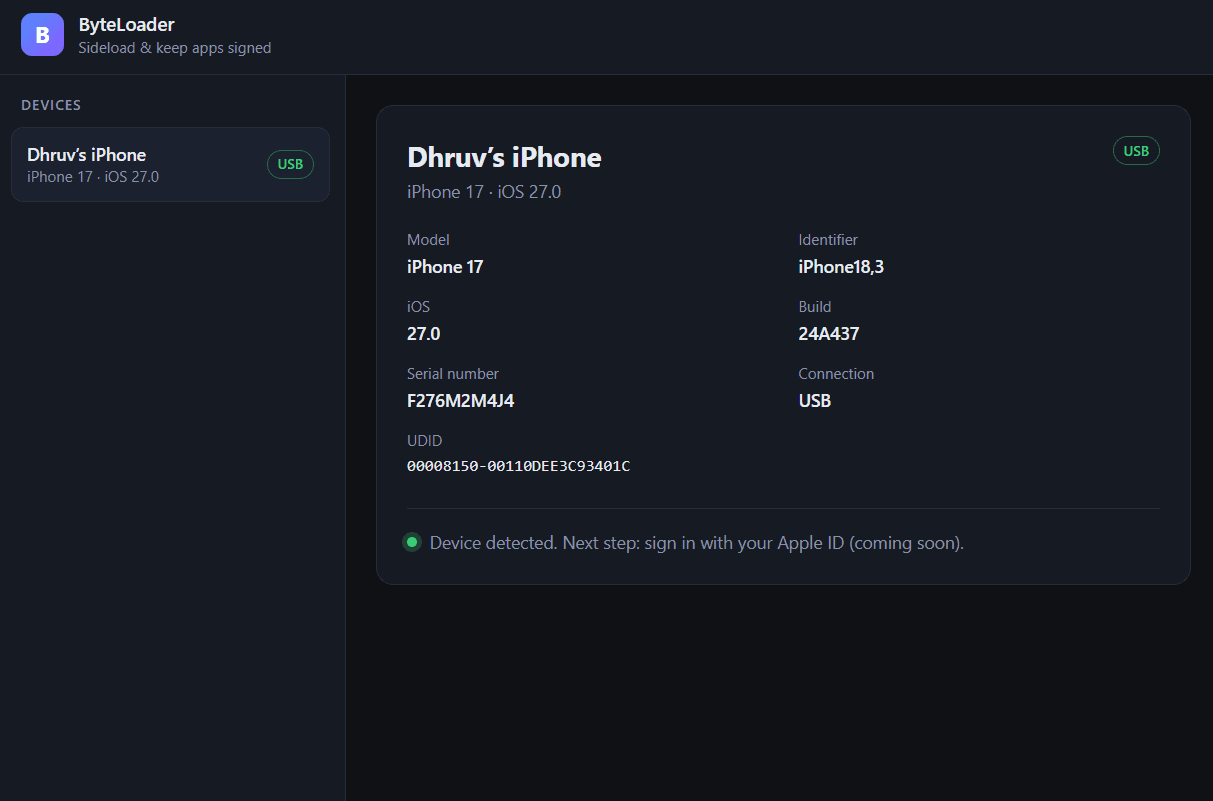
Plug your iPhone or iPad into your Windows PC and tap Trust This Computer. ByteLoader lists the device in its sidebar.
- 02
Sign in with your Apple ID
Enter your Apple ID and the two-factor code from a trusted device. A free Apple ID is all you need.
- 03
Drop the IPA and install
Drag the .ipa onto the window and press Install on device. ByteLoader signs it and pushes it to the phone.
- 04
Turn on Developer Mode and trust
On iOS 16 and later, switch on Developer Mode and trust the developer in Settings. The guide walks you through both.
Requirements
What you need before you start.
- PC
- Windows 10 or 11, 64-bit
- Apple driver
- Apple Mobile Device Service, which comes with iTunes or the Apple Devices app from the Microsoft Store
- Device
- iPhone or iPad on iOS 16 or later, connected with a USB cable
- Apple ID
- A free Apple ID. Apps signed with it last 7 days. A paid developer account is expected to give a year, untested.
- App package
- The .ipa file for the app you want to install
Good to know
The honest list. Read it before your first install.
Free Apple ID signatures last 7 days
That is Apple's rule, not ours. ByteLoader shows the expiry per app. To keep an app going, drop the IPA again and install. App data is kept because the bundle ID stays the same. A one-click Reinstall arrives in 0.1.1 and automatic re-signing in 0.2.0.
Apple's other free-account limits
Three installed apps at a time and ten app IDs per seven days. ByteLoader does not count these for you yet. If you hit a limit, Apple's error message is shown.
One sideloading tool per Apple ID
A free Apple ID allows a single development certificate. If Sideloadly or AltStore already holds it, ByteLoader revokes that certificate to install, and apps those tools installed stop opening. They would do the same in return.
USB only in 0.1.0
Devices with Wi-Fi sync may appear in the list, but installing over Wi-Fi is untested. Keep the cable plugged in.
Windows SmartScreen warning
The installer is not code-signed yet, so Windows may warn on first run. Choose More info, then Run anyway.
Some entitlements are not supported yet
Apps that need push notifications, iCloud, HealthKit or similar special entitlements may not work. App extensions have limited support. The bundle ID gets your team ID appended; the app name and icon are untouched.
Roadmap
What is coming next.
- Version 0.1.1
- Built-in guides for Developer Mode, trusting the certificate and what to do when an app stops opening
- One-click Reinstall
- Version 0.2.0
- Automatic re-signing before the 7-day expiry
- Runs from the system tray with Windows notifications
FAQ
Questions people ask about ByteLoader.
What is ByteLoader?+
ByteLoader is a free Windows app that signs IPA files with your own Apple ID and installs them on your iPhone or iPad over USB. It does what Sideloadly or AltServer do, with a minimal interface and no paid tier.
Do I need a paid Apple Developer account?+
No. A normal, free Apple ID works. Apps signed with a free Apple ID last 7 days, then you reinstall. A paid developer account on the same Apple ID is expected to give one-year signatures, but that is untested.
Is ByteLoader really free?+
Yes. There is no subscription and no paid tier.
Does it need a jailbreak?+
No. ByteLoader works with stock, non-jailbroken iPhones and iPads.
Which Windows and iOS versions are supported?+
Windows 10 or 11, 64-bit. On the phone side, iOS 16 or later. It is tested on current iOS. There is no macOS, Linux or web version.
Is my Apple ID password safe?+
Your password is sent only to Apple, using Apple's SRP login, so it is never transmitted in plain text and never reaches a ByteKnot server. If you tick Remember my password it is stored in Windows Credential Manager on your PC. Otherwise it is not stored.
What is the anisette server?+
Apple requires device-identity headers called anisette with every login. ByteLoader fetches them from a public anisette server run by the StikStore project, ani.stikstore.app. That server never sees your password or your IPA.
Why do apps stop opening after 7 days?+
Free Apple ID signatures expire after 7 days. ByteLoader shows the expiry date for every app it installed. Drop the IPA again and install to renew it; your app data is kept. Automatic renewal is planned for version 0.2.0.
I also use Sideloadly or AltStore. Is that a problem?+
Yes, on the same Apple ID. Apple allows one development certificate per free Apple ID, so ByteLoader revokes the existing one when it installs, and apps installed by the other tool stop opening. Use one tool per Apple ID, or reinstall those apps with ByteLoader.
Windows says the installer is unrecognised. What do I do?+
The installer is not code-signed yet, so SmartScreen warns. Click More info, then Run anyway. Download only from the official releases page.
My iPhone does not show up.+
ByteLoader needs Apple Mobile Device Service running. Install iTunes from Apple or the Apple Devices app from the Microsoft Store, then reconnect the cable, unlock the phone and tap Trust This Computer. ByteLoader has a button that re-triggers the trust prompt.
How do I turn on Developer Mode on iPhone?+
Open Settings, tap Privacy & Security, scroll down and tap Developer Mode, switch it on and tap Restart. After the restart, tap Turn On and enter your passcode. The switch only appears after a development app has been installed, so install from ByteLoader first.
How do I allow apps from a developer?+
Open Settings, tap General, then VPN & Device Management. Under Developer App tap the entry that starts with Apple Development, tap Trust, then Trust again. The phone needs internet access for this step. On iOS 14 and earlier the menu is called Device Management or Profiles & Device Management.
Can I install over Wi-Fi?+
Not in 0.1.0. Installing is USB only for now.
Can I use my own certificate and provisioning profile?+
Not yet. ByteLoader currently signs with the development certificate it creates from your Apple ID.
Does ByteLoader collect any data?+
No. There are no analytics, crash reports, update checks, ads or third-party SDKs in the app. Its only network traffic is Apple's sign-in and developer servers and the anisette server.
Is ByteLoader open source?+
No. The source is private. Public builds and release notes are published on GitHub at isthatdhruv/byteloader-release. It is built on the MIT-licensed isideload and idevice libraries.
Download · Windows 10 / 11, 64-bit
Get ByteLoader 0.1.0. It is free.
ByteLoader_0.1.0_x64-setup.exe (3.7 MB). An MSI package is attached to the same release. The installer is not code-signed yet, so if Windows SmartScreen warns, choose More info, then Run anyway.